Send a guest’s confirmation and ticket again if they didn’t get it.
In short: If a guest says they never got their confirmation or ticket, you can send it again from their record — by email or WhatsApp — without re-registering them.
Go to Registrations → Categories, click Manage on the guest’s ticket type, and open the Guests tab.
2
Resend
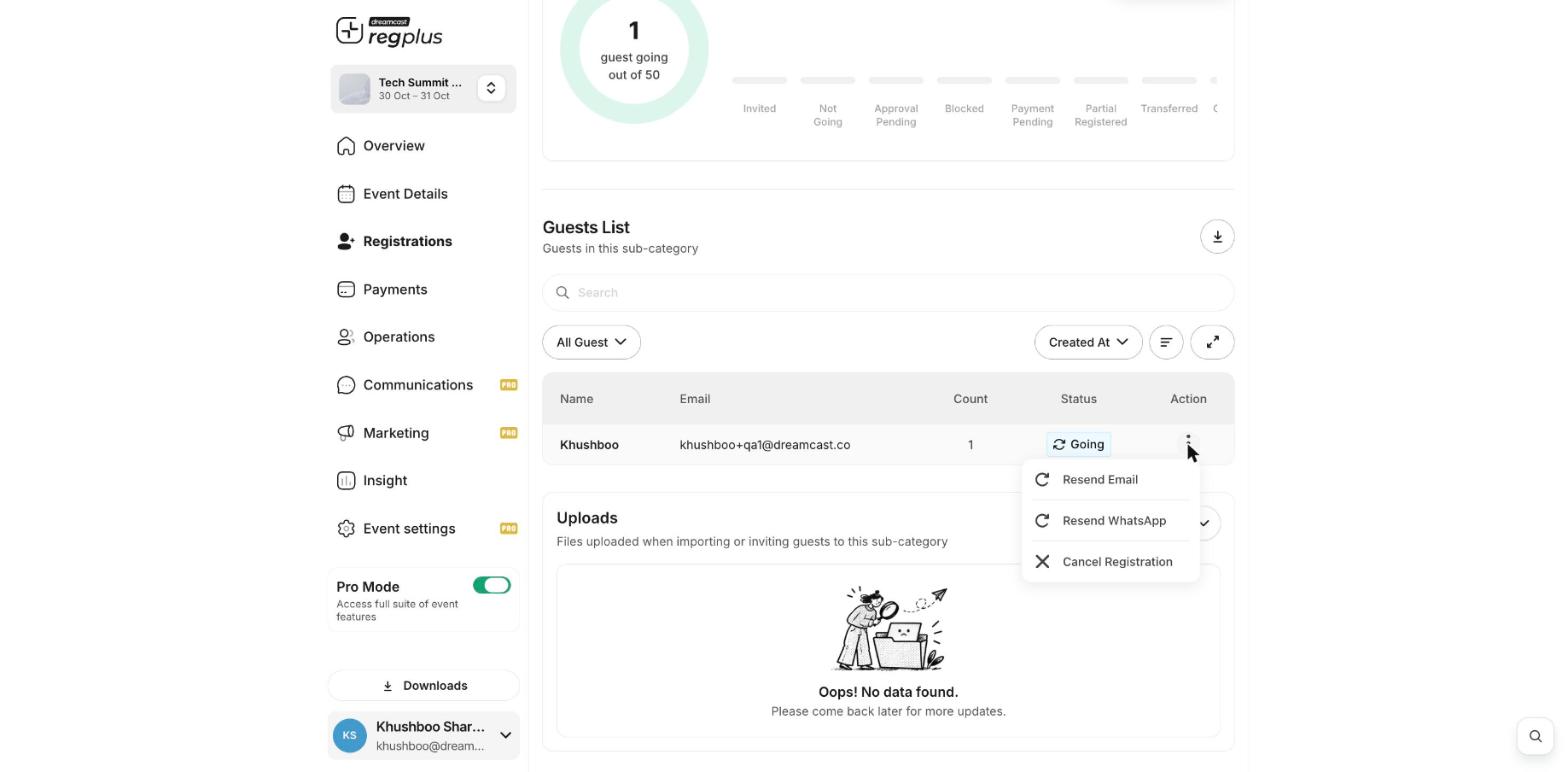
From the guest’s ⋮ menu, choose Resend Email or Resend WhatsApp.
Ask the guest to check their spam folder first. If their email or phone is wrong, fix it on their record (open the guest and Edit Details) before you resend. You can see email delivery under Insight → Marketing & Traffic.
{"docsConfig":{"theme":"mint","$schema":"https://mintlify.com/docs.json","name":"Dreamcast Help Center","colors":{"primary":"#7C0DFF","light":"#A35BFF","dark":"#5B1FFF"},"logo":{"light":"https://mintcdn.com/dreamcast-4085c99b/Ow8LTwl2PEJJCZ0A/logo/dreamcast-logo.png?fit=max\u0026auto=format\u0026n=Ow8LTwl2PEJJCZ0A\u0026q=85\u0026s=ae72f13e22cf1acac9d3904466f95d79","dark":"https://mintcdn.com/dreamcast-4085c99b/Ow8LTwl2PEJJCZ0A/logo/dreamcast-logo.png?fit=max\u0026auto=format\u0026n=Ow8LTwl2PEJJCZ0A\u0026q=85\u0026s=ae72f13e22cf1acac9d3904466f95d79"},"favicon":"https://mintcdn.com/dreamcast-4085c99b/8xzFJJjz9WQtaA16/images/favicon-v3.png?fit=max\u0026auto=format\u0026n=8xzFJJjz9WQtaA16\u0026q=85\u0026s=e3547e0e863cd0f5c39e6672207f954a","navbar":{"primary":{"type":"button","label":"Contact Support","href":"mailto:support@dreamcast.co"}},"seo":{"indexing":"all"},"fonts":{"family":"Poppins"},"styling":{"eyebrows":"breadcrumbs","latex":false},"integrations":{"ga4":{"measurementId":"G-8W76F5FXJX"}},"contextual":{"options":["copy","view","chatgpt","claude","perplexity","mcp","cursor","vscode"],"display":"header"},"navigation":{"pages":[]}},"deployment":{"deploymentMetadataValue":{"subdomain":"dreamcast-4085c99b","hasAudioNarration":false,"actualSubdomain":"dreamcast-4085c99b","customDomains":["help.dreamcast.in"],"gitSource":{"type":"github","owner":"mintlify-community","repo":"docs-dreamcast-4085c99b-0d7fec06","deployBranch":"main","contentDirectory":"","isPrivate":true,"mountPath":"","label":""},"chroma":{"latestBuiltDeploymentHistoryId":"6ad87841df39c05fa0b6c90f","collectionId":"aff122c2-650e-4d9e-ba25-51b3a9f26ad3","liveDeploymentHistoryId":"6ad87841df39c05fa0b6c90f","schemaVersion":"v3"},"entitlements":{"AI_CHAT":{"status":"ENABLED"},"WEB_MCP":{"status":"ENABLED"},"NARRATION":{"status":"ENABLED"}},"buildId":"6ad8cfd793e72255238d2261","clientVersion":"0.0.3908","searchFilterCounts":[{"language":"default","tag":"Regplus","count":50},{"language":"default","tag":"Help \u0026 Support","count":11},{"language":"default","tag":"How-to guides","count":10},{"language":"default","tag":"Get Started","count":8},{"language":"default","tag":"Account \u0026 billing","count":7},{"language":"default","tag":"Create \u0026 publish an event","count":7},{"language":"default","tag":"Track performance","count":7},{"language":"default","tag":"Picbot","count":6},{"language":"default","tag":"Snipin","count":6},{"language":"default","tag":"Promote your event","count":5}]},"assistantConfig":{"enableAskAiButton":false,"enableStarterQuestions":false,"enableContextualStarterQuestions":false,"enableAskAiSearchBar":true},"hasChatPermissions":true,"hasWebMcpPermissions":true,"toggles":[{"name":"kill-isr","enabled":true,"variant":{"name":"disabled","enabled":false,"feature_enabled":true},"impressionData":false},{"name":"agent-mintlify-slack","enabled":true,"variant":{"name":"disabled","enabled":false,"feature_enabled":true},"impressionData":false},{"name":"editor-v7-file-tree","enabled":true,"variant":{"name":"disabled","enabled":false,"feature_enabled":true},"impressionData":false},{"name":"agent-integrations-settings","enabled":true,"variant":{"name":"disabled","enabled":false,"feature_enabled":true},"impressionData":false},{"name":"automations-pr-grouping","enabled":true,"variant":{"name":"disabled","enabled":false,"feature_enabled":true},"impressionData":false},{"name":"custom-prefix","enabled":true,"variant":{"name":"disabled","enabled":false,"feature_enabled":true},"impressionData":false},{"name":"analytics-v7","enabled":true,"variant":{"name":"disabled","enabled":false,"feature_enabled":true},"impressionData":false},{"name":"user-flows-analytics","enabled":true,"variant":{"name":"disabled","enabled":false,"feature_enabled":true},"impressionData":false},{"name":"no-publish-flow","enabled":true,"variant":{"name":"disabled","enabled":false,"feature_enabled":true},"impressionData":false},{"name":"workos-onboarding","enabled":true,"variant":{"name":"disabled","enabled":false,"feature_enabled":true},"impressionData":false},{"name":"llms-txt-v2","enabled":true,"variant":{"name":"disabled","enabled":false,"feature_enabled":true},"impressionData":false},{"name":"pause-universal-search-reconcile","enabled":true,"variant":{"name":"disabled","enabled":false,"feature_enabled":true},"impressionData":false},{"name":"snapshot-serving-live","enabled":true,"variant":{"name":"disabled","enabled":false,"feature_enabled":true},"impressionData":false},{"name":"stripTemperatureMiddleware","enabled":true,"variant":{"name":"disabled","enabled":false,"feature_enabled":true},"impressionData":false},{"name":"per-site-search-delta","enabled":true,"variant":{"name":"disabled","enabled":false,"feature_enabled":true},"impressionData":false},{"name":"support-platform-pylon-zendesk","enabled":true,"variant":{"name":"disabled","enabled":false,"feature_enabled":true},"impressionData":false},{"name":"editor-branches-v2-autocommit","enabled":true,"variant":{"name":"disabled","enabled":false,"feature_enabled":true},"impressionData":false},{"name":"editor-branches-v2","enabled":true,"variant":{"name":"disabled","enabled":false,"feature_enabled":true},"impressionData":false},{"name":"snapshot-serving","enabled":true,"variant":{"name":"disabled","enabled":false,"feature_enabled":true},"impressionData":false},{"name":"instant-rollback","enabled":true,"variant":{"name":"disabled","enabled":false,"feature_enabled":true},"impressionData":false},{"name":"granular-notifications-server","enabled":true,"variant":{"name":"disabled","enabled":false,"feature_enabled":true},"impressionData":false},{"name":"granular-notifications","enabled":true,"variant":{"name":"disabled","enabled":false,"feature_enabled":true},"impressionData":false},{"name":"editor-private-page-search","enabled":true,"variant":{"name":"disabled","enabled":false,"feature_enabled":true},"impressionData":false},{"name":"automations-fable","enabled":true,"variant":{"name":"disabled","enabled":false,"feature_enabled":true},"impressionData":false},{"name":"fixed-ai-action-pricing","enabled":true,"variant":{"name":"disabled","enabled":false,"feature_enabled":true},"impressionData":false},{"name":"automation-resolve-merge-conflict","enabled":true,"variant":{"name":"disabled","enabled":false,"feature_enabled":true},"impressionData":false},{"name":"scoped-publishing","enabled":true,"variant":{"name":"disabled","enabled":false,"feature_enabled":true},"impressionData":false},{"name":"mintql","enabled":true,"variant":{"name":"disabled","enabled":false,"feature_enabled":true},"impressionData":false},{"name":"page-level-analytics","enabled":true,"variant":{"name":"disabled","enabled":false,"feature_enabled":true},"impressionData":false},{"name":"teamspace","enabled":true,"variant":{"name":"disabled","enabled":false,"feature_enabled":true},"impressionData":false},{"name":"editor-version-history-v2","enabled":true,"variant":{"name":"disabled","enabled":false,"feature_enabled":true},"impressionData":false},{"name":"editor-nav-generations","enabled":true,"variant":{"name":"disabled","enabled":false,"feature_enabled":true},"impressionData":false},{"name":"billing-page-v2","enabled":true,"variant":{"name":"disabled","enabled":false,"feature_enabled":true},"impressionData":false},{"name":"vite-origin","enabled":true,"variant":{"name":"disabled","enabled":false,"feature_enabled":true},"impressionData":false},{"name":"workspace-projects","enabled":true,"variant":{"name":"disabled","enabled":false,"feature_enabled":true},"impressionData":false},{"name":"assistant-v5","enabled":true,"variant":{"name":"disabled","enabled":false,"feature_enabled":true},"impressionData":false},{"name":"byok-sep-25","enabled":true,"variant":{"name":"disabled","enabled":false,"feature_enabled":true},"impressionData":false},{"name":"fork-pr-previews","enabled":true,"variant":{"name":"disabled","enabled":false,"feature_enabled":true},"impressionData":false},{"name":"revalidation-jwt","enabled":true,"variant":{"name":"disabled","enabled":false,"feature_enabled":true},"impressionData":false},{"name":"editor-agent-model-picker","enabled":true,"variant":{"name":"disabled","enabled":false,"feature_enabled":true},"impressionData":false},{"name":"client-snapshot-docs-config","enabled":true,"variant":{"name":"disabled","enabled":false,"feature_enabled":true},"impressionData":false},{"name":"hobby-abuse-scan","enabled":true,"variant":{"name":"disabled","enabled":false,"feature_enabled":true},"impressionData":false},{"name":"dashboard-inbox","enabled":true,"variant":{"name":"disabled","enabled":false,"feature_enabled":true},"impressionData":false}],"isAtlas":false,"googleFontsInlined":true},"customCss":[{"filePath":"style.css","content":"img.nav-logo{height:2.64rem!important;width:auto!important}html[data-current-path=\"/\"] .nav-dropdown-products-selector-trigger,html[data-current-path=\"/\"] nav-dropdown-products-selector-trigger{display:none!important}#navbar,#navbar>div{background:#fff!important}html.dark #navbar,html.dark #navbar>div{background:#0a0a0f!important}#sidebar-title,.sidebar-group-header h5{text-transform:uppercase;font-size:.75rem;letter-spacing:.04em}"}],"page":{"pagePath":"regplus/how-to-resend-ticket","slug":"/regplus/how-to-resend-ticket","pageMetadata":{"title":"How to resend a guest's ticket or confirmation","sidebarTitle":"Resend a ticket","description":"Send a guest's confirmation and ticket again if they didn't get it.","icon":"paper-plane","href":"/regplus/how-to-resend-ticket"},"description":{"compiledSource":"\"use strict\";\nconst {jsx: _jsx} = arguments[0];\nconst {useMDXComponents: _provideComponents} = arguments[0];\nfunction _createMdxContent(props) {\n const _components = {\n p: \"p\",\n ..._provideComponents(),\n ...props.components\n };\n return _jsx(_components.p, {\n children: \"Send a guest’s confirmation and ticket again if they didn’t get it.\"\n });\n}\nfunction MDXContent(props = {}) {\n const {wrapper: MDXLayout} = {\n ..._provideComponents(),\n ...props.components\n };\n return MDXLayout ? _jsx(MDXLayout, {\n ...props,\n children: _jsx(_createMdxContent, {\n ...props\n })\n }) : _createMdxContent(props);\n}\nreturn {\n default: MDXContent\n};\n","frontmatter":{},"scope":{}},"pageType":"default","mdx":{"mdxSource":{"compiledSource":"\"use strict\";const{Fragment:_Fragment,jsx:_jsx,jsxs:_jsxs}=arguments[0];const{useMDXComponents:_provideComponents}=arguments[0];function _createMdxContent(props){const _components={p:`p`,strong:`strong`,..._provideComponents(),...props.components},{Card,CardGroup,Frame,Heading,OptimizedImage,Step,Steps,Tip}=_components;if(!Card)_missingMdxReference(`Card`,true);if(!CardGroup)_missingMdxReference(`CardGroup`,true);if(!Frame)_missingMdxReference(`Frame`,true);if(!Heading)_missingMdxReference(`Heading`,true);if(!OptimizedImage)_missingMdxReference(`OptimizedImage`,true);if(!Step)_missingMdxReference(`Step`,true);if(!Steps)_missingMdxReference(`Steps`,true);if(!Tip)_missingMdxReference(`Tip`,true);return _jsxs(_Fragment,{children:[_jsxs(_components.p,{children:[_jsx(_components.strong,{children:`In short:`}),` If a guest says they never got their confirmation or ticket, you can send it again from their record — by email or WhatsApp — without re-registering them.`]}),`\n`,_jsx(Heading,{level:`2`,id:`resend-to-a-guest`,children:`Resend to a guest`}),`\n`,_jsxs(Steps,{children:[_jsx(Step,{title:`Open the guest list`,children:_jsxs(_components.p,{children:[`Go to `,_jsx(_components.strong,{children:`Registrations → Categories`}),`, click `,_jsx(_components.strong,{children:`Manage`}),` on the guest’s ticket type, and open the `,_jsx(_components.strong,{children:`Guests`}),` tab.`]})}),_jsxs(Step,{title:`Resend`,children:[_jsxs(_components.p,{children:[`From the guest’s `,_jsx(_components.strong,{children:`⋮`}),` menu, choose `,_jsx(_components.strong,{children:`Resend Email`}),` or `,_jsx(_components.strong,{children:`Resend WhatsApp`}),`.`]}),_jsx(Frame,{children:_jsx(OptimizedImage,{src:`https://mintcdn.com/dreamcast-4085c99b/_o5Se_NeT7nv_9IS/images/regplus-guest-actions.jpg?fit=max\u0026auto=format\u0026n=_o5Se_NeT7nv_9IS\u0026q=85\u0026s=95515eca98f151a471c8740bb3ece30d`,alt:`The guest actions menu with Resend Email and Resend WhatsApp`,\"data-og-width\":`1568`,width:`1568`,\"data-og-height\":`772`,height:`772`,\"data-path\":`images/regplus-guest-actions.jpg`,\"data-optimize\":`true`,\"data-opv\":`3`,srcset:`https://mintcdn.com/dreamcast-4085c99b/_o5Se_NeT7nv_9IS/images/regplus-guest-actions.jpg?w=280\u0026fit=max\u0026auto=format\u0026n=_o5Se_NeT7nv_9IS\u0026q=85\u0026s=f67706c365f6e5b2945c21653dc5db1b 280w, https://mintcdn.com/dreamcast-4085c99b/_o5Se_NeT7nv_9IS/images/regplus-guest-actions.jpg?w=560\u0026fit=max\u0026auto=format\u0026n=_o5Se_NeT7nv_9IS\u0026q=85\u0026s=f1d20f1ea7ceabf5454992f7c68232ba 560w, https://mintcdn.com/dreamcast-4085c99b/_o5Se_NeT7nv_9IS/images/regplus-guest-actions.jpg?w=840\u0026fit=max\u0026auto=format\u0026n=_o5Se_NeT7nv_9IS\u0026q=85\u0026s=6f7eec231866ee65fc7f0fd4d6536c92 840w, https://mintcdn.com/dreamcast-4085c99b/_o5Se_NeT7nv_9IS/images/regplus-guest-actions.jpg?w=1100\u0026fit=max\u0026auto=format\u0026n=_o5Se_NeT7nv_9IS\u0026q=85\u0026s=49fdb27e0b194bcfc9d946669c8c61c2 1100w, https://mintcdn.com/dreamcast-4085c99b/_o5Se_NeT7nv_9IS/images/regplus-guest-actions.jpg?w=1650\u0026fit=max\u0026auto=format\u0026n=_o5Se_NeT7nv_9IS\u0026q=85\u0026s=0b49c1d5ceb88ca6f7f50bac03e955d1 1650w, https://mintcdn.com/dreamcast-4085c99b/_o5Se_NeT7nv_9IS/images/regplus-guest-actions.jpg?w=2500\u0026fit=max\u0026auto=format\u0026n=_o5Se_NeT7nv_9IS\u0026q=85\u0026s=1f95257074af06fc1f0b9b1c9a7e59aa 2500w`})})]})]}),`\n`,_jsx(Tip,{children:_jsxs(_components.p,{children:[`Ask the guest to check their spam folder first. If their email or phone is wrong, fix it on their record (open the guest and `,_jsx(_components.strong,{children:`Edit Details`}),`) before you resend. You can see email delivery under `,_jsx(_components.strong,{children:`Insight → Marketing \u0026 Traffic`}),`.`]})}),`\n`,_jsx(Heading,{level:`2`,id:`what’s-next`,children:`What’s next?`}),`\n`,_jsxs(CardGroup,{cols:2,children:[_jsx(Card,{title:`Manage registrants`,icon:`users`,href:`/regplus/manage-registrants`,children:_jsx(_components.p,{children:`Find and edit a guest.`})}),_jsx(Card,{title:`Set up WhatsApp and email`,icon:`plug`,href:`/regplus/integrations`,children:_jsx(_components.p,{children:`Control how your messages are sent.`})})]})]})}function MDXContent(props={}){const{wrapper:MDXLayout}={..._provideComponents(),...props.components};return MDXLayout?_jsx(MDXLayout,{...props,children:_jsx(_createMdxContent,{...props})}):_createMdxContent(props)}return{default:MDXContent};function _missingMdxReference(id,component){throw new Error(`Expected `+(component?`component`:`object`)+\" `\"+id+\"` to be defined: you likely forgot to import, pass, or provide it.\")}","frontmatter":{},"scope":{"config":{},"pageMetadata":{"title":"How to resend a guest's ticket or confirmation","sidebarTitle":"Resend a ticket","description":"Send a guest's confirmation and ticket again if they didn't get it.","icon":"paper-plane","href":"/regplus/how-to-resend-ticket"}}},"mdxSourceWithNoJs":null},"mdxExtracts":{"tableOfContents":[{"title":"Resend to a guest","slug":"resend-to-a-guest","depth":2,"children":[]},{"title":"What’s next?","slug":"what’s-next","depth":2,"children":[]}],"codeExamples":{}},"jsLinks":[],"subdomain":"dreamcast-4085c99b","siteName":"Dreamcast Help Center","title":"How to resend a guest's ticket or confirmation - Dreamcast Help Center","navMaps":{"firstHrefInVersion":{},"firstHrefInLanguage":{}},"lastModified":"2026-10-21T14:45:29.771Z","originalFileLocation":"regplus/how-to-resend-ticket.mdx"},"headHtml":"\u003cscript data-mint-head>(function(){var d=document.documentElement,p=null;if(!p){try{p=localStorage.getItem(\"isDarkMode\")}catch(e){}if(p==='true')p='dark';else if(p==='false')p='light';if(p!=='light'\u0026\u0026p!=='dark'\u0026\u0026p!=='system')p=\"system\"}var r=p==='system'?(matchMedia(\"(prefers-color-scheme: dark)\").matches?'dark':'light'):p;d.classList.remove(r==='dark'?'light':'dark');d.classList.add(r);d.setAttribute(\"data-theme-preference\",p)})();\u003c/script>\u003cmeta data-mint-head name=\"description\" content=\"Send a guest\u0026#x27;s confirmation and ticket again if they didn\u0026#x27;t get it.\">\u003cmeta data-mint-head name=\"application-name\" content=\"Dreamcast Help Center\">\u003cmeta data-mint-head name=\"generator\" content=\"Mintlify\">\u003clink data-mint-head rel=\"icon\" type=\"image/png\" sizes=\"192x192\" href=\"/mintlify-assets/_mintlify/favicons/dreamcast-4085c99b/n5VBGNjK0WAEpCwz/_generated/favicon/android-chrome-192x192.png\" media=\"(prefers-color-scheme: light)\">\u003clink data-mint-head rel=\"apple-touch-icon\" type=\"image/png\" sizes=\"180x180\" href=\"/mintlify-assets/_mintlify/favicons/dreamcast-4085c99b/n5VBGNjK0WAEpCwz/_generated/favicon/apple-touch-icon.png\">\u003clink data-mint-head rel=\"icon\" type=\"image/png\" sizes=\"16x16\" href=\"/mintlify-assets/_mintlify/favicons/dreamcast-4085c99b/n5VBGNjK0WAEpCwz/_generated/favicon/favicon-16x16.png\" media=\"(prefers-color-scheme: light)\">\u003clink data-mint-head rel=\"icon\" type=\"image/png\" sizes=\"32x32\" href=\"/mintlify-assets/_mintlify/favicons/dreamcast-4085c99b/n5VBGNjK0WAEpCwz/_generated/favicon/favicon-32x32.png\" media=\"(prefers-color-scheme: light)\">\u003clink data-mint-head rel=\"shortcut icon\" type=\"image/x-icon\" href=\"/mintlify-assets/_mintlify/favicons/dreamcast-4085c99b/n5VBGNjK0WAEpCwz/_generated/favicon/favicon.ico\" media=\"(prefers-color-scheme: light)\">\u003clink data-mint-head rel=\"icon\" type=\"image/png\" sizes=\"192x192\" href=\"/mintlify-assets/_mintlify/favicons/dreamcast-4085c99b/n5VBGNjK0WAEpCwz/_generated/favicon-dark/android-chrome-192x192.png\" media=\"(prefers-color-scheme: dark)\">\u003clink data-mint-head rel=\"icon\" type=\"image/png\" sizes=\"16x16\" href=\"/mintlify-assets/_mintlify/favicons/dreamcast-4085c99b/n5VBGNjK0WAEpCwz/_generated/favicon-dark/favicon-16x16.png\" media=\"(prefers-color-scheme: dark)\">\u003clink data-mint-head rel=\"icon\" type=\"image/png\" sizes=\"32x32\" href=\"/mintlify-assets/_mintlify/favicons/dreamcast-4085c99b/n5VBGNjK0WAEpCwz/_generated/favicon-dark/favicon-32x32.png\" media=\"(prefers-color-scheme: dark)\">\u003clink data-mint-head rel=\"shortcut icon\" type=\"image/x-icon\" href=\"/mintlify-assets/_mintlify/favicons/dreamcast-4085c99b/n5VBGNjK0WAEpCwz/_generated/favicon-dark/favicon.ico\" media=\"(prefers-color-scheme: dark)\">\u003cmeta data-mint-head property=\"og:title\" content=\"How to resend a guest\u0026#x27;s ticket or confirmation - Dreamcast Help Center\">\u003cmeta data-mint-head property=\"og:description\" content=\"Send a guest\u0026#x27;s confirmation and ticket again if they didn\u0026#x27;t get it.\">\u003cmeta data-mint-head property=\"og:site_name\" content=\"Dreamcast Help Center\">\u003cmeta data-mint-head property=\"og:url\" content=\"https://help.dreamcast.in/regplus/how-to-resend-ticket\">\u003cmeta data-mint-head property=\"og:type\" content=\"website\">\u003cmeta data-mint-head name=\"twitter:card\" content=\"summary_large_image\">\u003cmeta data-mint-head name=\"twitter:title\" content=\"How to resend a guest\u0026#x27;s ticket or confirmation - Dreamcast Help Center\">\u003cmeta data-mint-head name=\"twitter:description\" content=\"Send a guest\u0026#x27;s confirmation and ticket again if they didn\u0026#x27;t get it.\">\u003cmeta data-mint-head name=\"msapplication-config\" content=\"/mintlify-assets/_mintlify/favicons/dreamcast-4085c99b/n5VBGNjK0WAEpCwz/_generated/favicon/browserconfig.xml\">\u003cmeta data-mint-head name=\"apple-mobile-web-app-title\" content=\"Dreamcast Help Center\">\u003cmeta data-mint-head name=\"msapplication-TileColor\" content=\"#7C0DFF\">\u003clink data-mint-head rel=\"canonical\" href=\"https://help.dreamcast.in/regplus/how-to-resend-ticket\">\u003clink data-mint-head rel=\"alternate\" type=\"application/xml\" href=\"/sitemap.xml\">\u003clink data-mint-head rel=\"alternate\" type=\"text/markdown\" href=\"/regplus/how-to-resend-ticket.md\">\u003cscript data-mint-head type=\"application/ld+json\">{\"@context\":\"https://schema.org\",\"@graph\":[{\"@type\":\"Organization\",\"@id\":\"https://help.dreamcast.in/#organization\",\"name\":\"Dreamcast Help Center\",\"url\":\"https://help.dreamcast.in\",\"logo\":{\"@type\":\"ImageObject\",\"url\":\"https://mintcdn.com/dreamcast-4085c99b/Ow8LTwl2PEJJCZ0A/logo/dreamcast-logo.png?fit=max\u0026auto=format\u0026n=Ow8LTwl2PEJJCZ0A\u0026q=85\u0026s=ae72f13e22cf1acac9d3904466f95d79\"}},{\"@type\":\"WebSite\",\"@id\":\"https://help.dreamcast.in#website\",\"name\":\"Dreamcast Help Center\",\"url\":\"https://help.dreamcast.in\",\"publisher\":{\"@id\":\"https://help.dreamcast.in/#organization\"}},{\"@type\":\"WebPage\",\"@id\":\"https://help.dreamcast.in/regplus/how-to-resend-ticket#webpage\",\"url\":\"https://help.dreamcast.in/regplus/how-to-resend-ticket\",\"name\":\"How to resend a guest's ticket or confirmation\",\"description\":\"Send a guest's confirmation and ticket again if they didn't get it.\",\"dateModified\":\"2026-10-21T14:45:29.771Z\",\"isPartOf\":{\"@id\":\"https://help.dreamcast.in#website\"},\"breadcrumb\":{\"@id\":\"https://help.dreamcast.in/regplus/how-to-resend-ticket#breadcrumb\"}},{\"@type\":\"BreadcrumbList\",\"@id\":\"https://help.dreamcast.in/regplus/how-to-resend-ticket#breadcrumb\",\"itemListElement\":[{\"@type\":\"ListItem\",\"position\":1,\"name\":\"How-to guides\",\"item\":\"https://help.dreamcast.in/regplus/how-to-external-link\"},{\"@type\":\"ListItem\",\"position\":2,\"name\":\"How to resend a guest's ticket or confirmation\",\"item\":\"https://help.dreamcast.in/regplus/how-to-resend-ticket\"}]},{\"@type\":[\"Article\",\"TechArticle\"],\"@id\":\"https://help.dreamcast.in/regplus/how-to-resend-ticket#article\",\"headline\":\"How to resend a guest's ticket or confirmation\",\"name\":\"How to resend a guest's ticket or confirmation\",\"description\":\"Send a guest's confirmation and ticket again if they didn't get it.\",\"url\":\"https://help.dreamcast.in/regplus/how-to-resend-ticket\",\"mainEntityOfPage\":{\"@id\":\"https://help.dreamcast.in/regplus/how-to-resend-ticket#webpage\"},\"dateModified\":\"2026-10-21T14:45:29.771Z\",\"publisher\":{\"@id\":\"https://help.dreamcast.in/#organization\"},\"isPartOf\":{\"@id\":\"https://help.dreamcast.in#website\"}}]}\u003c/script>\u003cscript data-mint-head type=\"application/ld+json\">{\"@context\":\"https://schema.org\",\"@type\":\"WebSite\",\"name\":\"Dreamcast Help Center\",\"creator\":{\"@type\":\"Organization\",\"name\":\"Mintlify\",\"url\":\"https://mintlify.com\"}}\u003c/script>","siteName":"Dreamcast Help Center","nav":{"global":null,"products":[{"product":"Regplus","icon":"clipboard-list","groups":[{"group":"Get Started","icon":"rocket","expanded":true,"pages":[{"title":"What is Regplus?","sidebarTitle":"What is Regplus?","icon":"circle-info","href":"/regplus/what-is-regplus"},{"title":"Create your account","sidebarTitle":"Create your account","href":"/regplus/overview"},{"title":"Set up your profile","sidebarTitle":"Set up your profile","href":"/registration/getting-started/quickstart"},{"title":"A quick tour of your dashboard","sidebarTitle":"A quick tour","icon":"compass","href":"/regplus/quick-tour"}]},{"group":"Create \u0026 publish an event","icon":"calendar-plus","pages":[{"title":"Create your first event","sidebarTitle":"Create your first event","href":"/regplus/create-your-first-event"},{"title":"Build your registration form","sidebarTitle":"Registration form","icon":"list-check","href":"/regplus/registration-form"},{"title":"Set up ticket types \u0026 pricing","sidebarTitle":"Ticket types \u0026 pricing","icon":"ticket","href":"/regplus/ticket-types"},{"title":"Turn on payments \u0026 set a price","sidebarTitle":"Payments, taxes \u0026 fees","icon":"credit-card","href":"/regplus/payments"},{"title":"Create a discount code","sidebarTitle":"Discounts \u0026 coupons","icon":"tag","href":"/regplus/discounts"},{"title":"Publish \u0026 share your event page","sidebarTitle":"Publish \u0026 share","icon":"share-nodes","href":"/regplus/publish-share"},{"title":"Edit your event details","sidebarTitle":"Edit event details","icon":"pen-to-square","href":"/regplus/event-details"}]},{"group":"Registrations \u0026 attendees","icon":"users","pages":[{"title":"Send invitations \u0026 collect RSVPs","sidebarTitle":"Invitations \u0026 RSVPs","icon":"envelope","href":"/regplus/invitations-rsvp"},{"title":"Manage your registrant list","sidebarTitle":"Manage registrants","icon":"users","href":"/regplus/manage-registrants"},{"title":"Approvals, limits \u0026 waitlists","sidebarTitle":"Approvals \u0026 limits","icon":"user-check","href":"/regplus/approvals-limits"},{"title":"Badges \u0026 on-ground check-in","sidebarTitle":"Badges \u0026 check-in","icon":"qrcode","href":"/regplus/badges-check-in"}]},{"group":"Communicate","icon":"comments","pages":[{"title":"Emails \u0026 WhatsApp messages","sidebarTitle":"Emails \u0026 WhatsApp","icon":"comments","href":"/regplus/emails-whatsapp"},{"title":"Confirmations \u0026 reminders","sidebarTitle":"Confirmations \u0026 reminders","icon":"bell","href":"/regplus/confirmations-reminders"},{"title":"Set up WhatsApp and email","sidebarTitle":"Integrations","icon":"plug","href":"/regplus/integrations"}]},{"group":"Track performance","icon":"chart-line","pages":[{"title":"Insights \u0026 reports","sidebarTitle":"Insights \u0026 reports","icon":"chart-line","href":"/regplus/insights-reports"},{"title":"Export your data","sidebarTitle":"Exports","icon":"file-export","href":"/regplus/exports"},{"title":"Read your financial report","sidebarTitle":"Financial report","icon":"indian-rupee-sign","href":"/regplus/insight-financial"},{"title":"Track marketing and traffic","sidebarTitle":"Marketing \u0026 Traffic","icon":"chart-mixed","href":"/regplus/insight-marketing"},{"title":"See attendee dynamics","sidebarTitle":"Attendee Dynamics","icon":"people-arrows","href":"/regplus/insight-attendee-dynamics"},{"title":"Check bounced orders","sidebarTitle":"Bounced","icon":"arrow-rotate-left","href":"/regplus/insight-bounced"},{"title":"Schedule reports by email","sidebarTitle":"Schedule Report","icon":"clock","href":"/regplus/insight-schedule-report"}]},{"group":"Promote your event","icon":"bullhorn","pages":[{"title":"Track where sign-ups come from","sidebarTitle":"Tracking links (UTM)","icon":"link","href":"/regplus/tracking-links"},{"title":"Connect a Meta Pixel","sidebarTitle":"Meta Pixel for ads","icon":"meta","href":"/regplus/meta-pixel"},{"title":"Add a LinkedIn share card","sidebarTitle":"Social sharing","icon":"linkedin","href":"/regplus/social-sharing"},{"title":"Embed your event on your website","sidebarTitle":"Embed event","icon":"code","href":"/regplus/embed-event"},{"title":"Let guests download their badge","sidebarTitle":"Download M-Badge","icon":"id-badge","href":"/regplus/download-m-badge"}]},{"group":"Account \u0026 billing","icon":"credit-card","pages":[{"title":"Plans \u0026 billing","sidebarTitle":"Plans \u0026 billing","icon":"credit-card","href":"/regplus/plans-billing"},{"title":"Team access \u0026 roles","sidebarTitle":"Team access \u0026 roles","icon":"user-group","href":"/regplus/team-access"},{"title":"Roles \u0026 permissions","sidebarTitle":"Roles \u0026 permissions","icon":"user-lock","href":"/regplus/roles-permissions"},{"title":"Advanced mode: more tools when you need them","sidebarTitle":"Advanced mode","icon":"sliders","href":"/regplus/advanced-mode"},{"title":"Connect apps \u0026 extensions","sidebarTitle":"Extensions","icon":"puzzle-piece","href":"/regplus/extensions"},{"title":"Webhooks \u0026 API","sidebarTitle":"Developers \u0026 API","icon":"code","href":"/regplus/developers-api"},{"title":"Delete your event","sidebarTitle":"Danger zone","icon":"triangle-exclamation","href":"/regplus/danger-zone"}]},{"group":"How-to guides","icon":"book-open","pages":[{"title":"How to send guests to an external ticketing page","sidebarTitle":"Send guests to an external page","icon":"arrow-up-right-from-square","href":"/regplus/how-to-external-link"},{"title":"How to let guests add your event to their calendar","sidebarTitle":"Add to calendar","icon":"calendar-check","href":"/regplus/how-to-add-to-calendar"},{"title":"How to prevent duplicate sign-ups","sidebarTitle":"Prevent duplicate sign-ups","icon":"user-xmark","href":"/regplus/how-to-prevent-duplicate-signups"},{"title":"How to issue a refund","sidebarTitle":"Issue a refund","icon":"rotate-left","href":"/regplus/how-to-issue-refund"},{"title":"How to check in guests on event day","sidebarTitle":"Check in guests","icon":"qrcode","href":"/regplus/how-to-check-in-guests"},{"title":"How to add a guest manually","sidebarTitle":"Add a guest manually","icon":"user-plus","href":"/regplus/how-to-add-guest-manually"},{"title":"How to export your guest list","sidebarTitle":"Export your guest list","icon":"file-export","href":"/regplus/how-to-export-guests"},{"title":"How to move a guest to a different ticket type","sidebarTitle":"Move a guest's ticket","description":"Move a guest to a different ticket type by cancelling and re-adding them.","icon":"right-left","href":"/regplus/how-to-change-ticket"},{"title":"How to resend a guest's ticket or confirmation","sidebarTitle":"Resend a ticket","icon":"paper-plane","href":"/regplus/how-to-resend-ticket"},{"title":"How to make your event invite-only","sidebarTitle":"Make an event invite-only","description":"Keep your event off public view and let only invited people register.","icon":"lock","href":"/regplus/how-to-invite-only-event"}]},{"group":"Help \u0026 Support","icon":"life-ring","pages":[{"title":"Reg Plus Frequently Asked Questions","sidebarTitle":"FAQ","href":"/registration/support/faq"},{"title":"Contact Regplus Customer Support","sidebarTitle":"Contact Support","href":"/registration/support/contact"},{"title":"Fix common Regplus issues","sidebarTitle":"Common issues","href":"/registration/troubleshooting/common-issues"}]}]},{"product":"Snipin","icon":"scissors","hidden":true,"pages":[{"title":"Snipin","href":"/snipin/overview"}]},{"product":"Picbot","icon":"images","pages":[{"title":"Picbot","href":"/picbot/overview"}]}]},"title":"How to resend a guest's ticket or confirmation - Dreamcast Help Center","buildId":"dpl_CUnGQP1HgFUzoxatVC37y4zP83Vx","deploymentId":"dpl_CUnGQP1HgFUzoxatVC37y4zP83Vx","dynamics":["07c022d89b","a74be98ba7"],"chunks":["Frame-BCFzRGe_.js","DynamicMarkdown-BUuAYxJE.js","zoom-image-lightbox-DQ5W4Q2v.js","PlusIcon-jZ8vgk6R.js","lightbox-handle-r17bVUz3.js"]}