
Prefer no setup? The built-in Platform gateway works out of the box. Connect Stripe only if you want payments in your own Stripe account.
What you’ll need
- A Stripe account activated for payments.
- Access to Payments → Configurations in your Reg Plus event.
- Your Stripe dashboard open in another tab.
Step 1 — Open the Stripe connection form
1
Go to Payments
Open Payments → Configurations in your event.
2
Add Stripe
Under Other gateways, click Add Other and choose Stripe.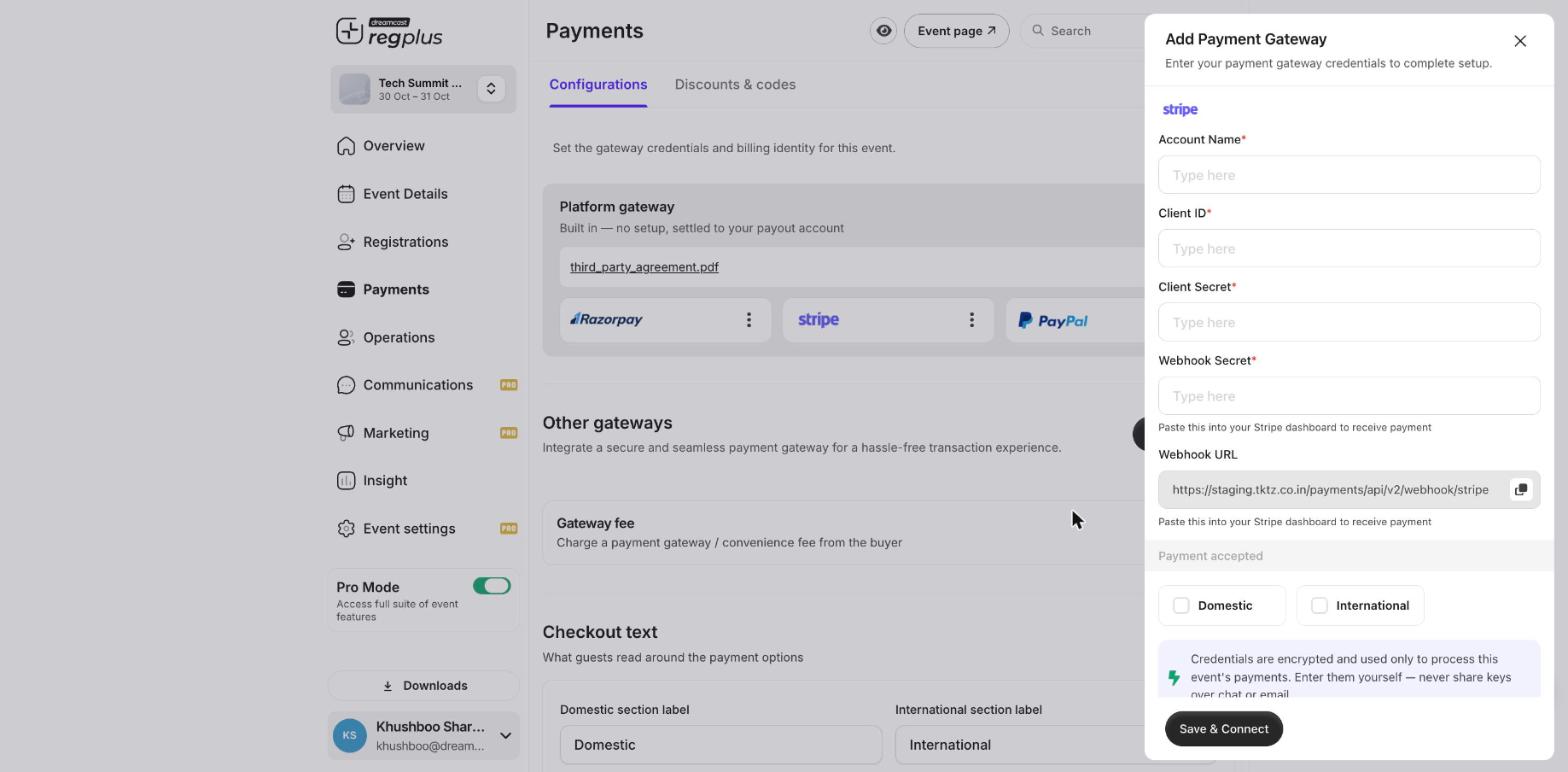
Step 2 — Get your keys and webhook from Stripe
1
Open your API keys
In the Stripe Dashboard, go to Developers → API keys. You’ll use your publishable key and your secret key.
2
Add a webhook
Go to Developers → Webhooks → Add endpoint, paste the Webhook URL from the Reg Plus form, and select the payment events. Stripe gives you a signing secret for the endpoint — copy it.
Stripe has test and live keys. Use test keys to trial the flow, then switch to live keys before taking real bookings.
Step 3 — Finish the connection in Reg Plus
Fill each field, then click Save & Connect.Test before you go live
Make a test booking and confirm it shows as paid in Insight → Financial. If it’s charged but not confirmed, re-check the webhook endpoint URL and signing secret in Stripe.FAQ
Which should I use — Stripe or Razorpay?
Which should I use — Stripe or Razorpay?
Razorpay suits Indian domestic payments (UPI, net banking, local cards); Stripe suits international cards. Pick the one that matches where most of your guests pay from.
A payment was charged but the booking didn't confirm
A payment was charged but the booking didn't confirm
The webhook didn’t reach Reg Plus. In Stripe, check the endpoint URL matches the Reg Plus Webhook URL and that the signing secret is the same on both sides.
What’s next?
Set up Razorpay
Connect Razorpay for domestic payments.
Set up PayPal
Connect PayPal for your event.